MDX components
MDX lets a Markdown document use component tags alongside prose. It is the format used by many documentation frameworks, and it normally needs a build step or a dev server to view. Twain renders MDX directly, and it does so safely: no code in an MDX file is ever compiled or run.
MDX component handling applies to files with the .mdx extension. In a plain .md file, a
component tag is treated as raw HTML: if its name is not a known HTML tag, the sanitiser drops the
tag but keeps the text inside it, so <Note>Read this</Note> renders as the words Read this, with
no callout box.
Known components render as real UI
Twain recognises a set of common documentation components and renders them as proper formatted elements. These include:
- Callouts:
Note,Info,Tip,Success,Hint,Warning,Caution,Attention,Important,Danger,Error,Aside, and a genericCallout. Names are matched without regard to case, and they share five colours:Info,CalloutandAsidetake theNotecolour,SuccessandHinttake theTipcolour, andCautionandAttentiontake theWarningcolour. The boxes reuse the alert styling, with one difference: a GFM[!CAUTION]alert takes theDangercolour, while an MDX<Caution>takes theWarningone. - Steps and Step, rendered as a numbered vertical list.
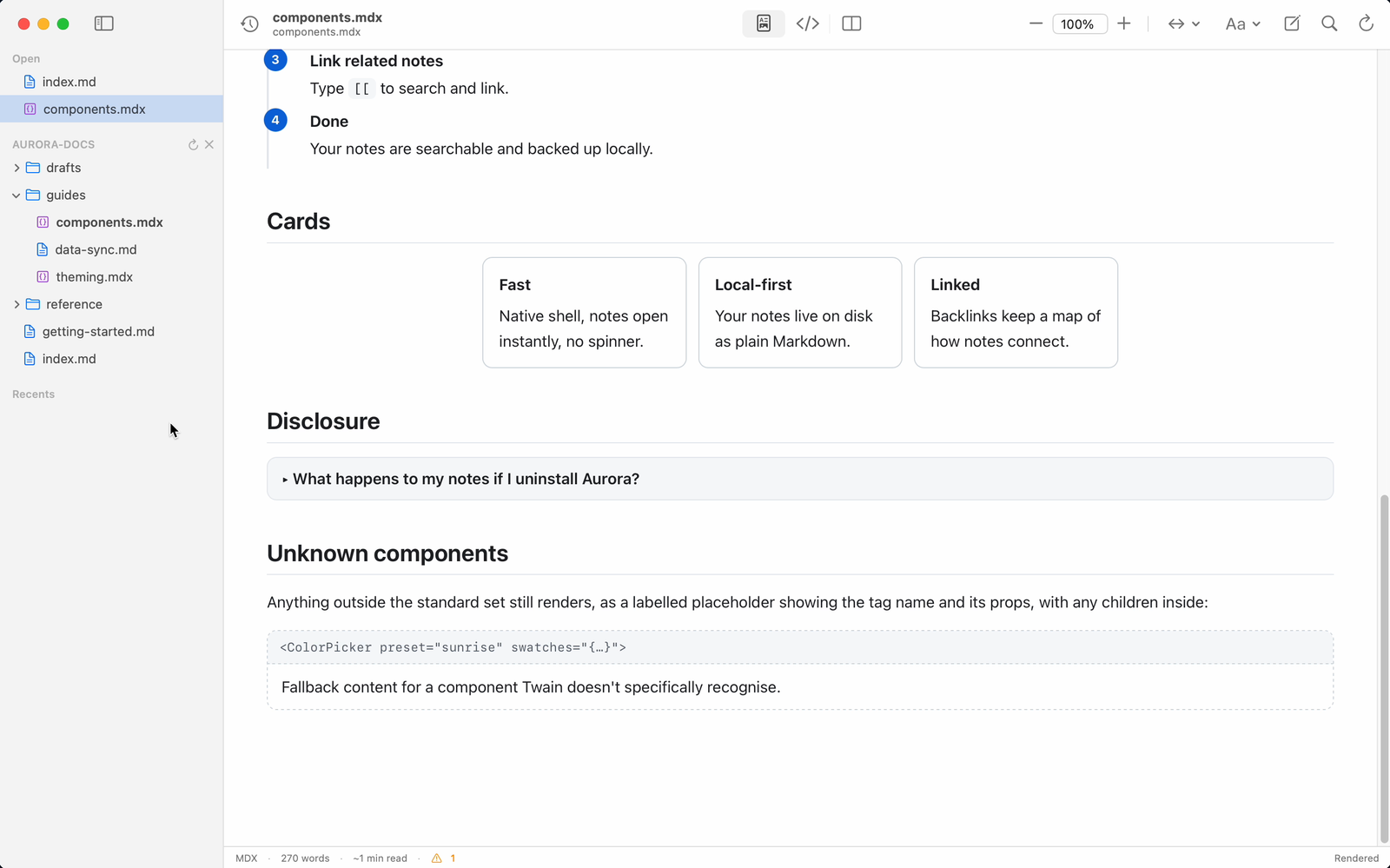
- Tabs and Tab / TabItem, rendered as a stacked set of labelled panels. Twain does not draw a clickable tab strip: every panel is shown at once, each under its own label.
- Card and CardGroup, rendered as a card grid.
- Details and Summary, rendered as a native disclosure that expands and collapses.
- Frame, Figure, and Figcaption.
A callout can take a title to set its header, and a generic callout can take a type to choose
its colour:
<Note title="Before you begin">
Make sure the app is in your Applications folder.
</Note>

<Callout type="warning">
This step cannot be undone.
</Callout>
Many frameworks use their own component names (for example Docusaurus Admonition, or Mintlify
CardGroup). Twain can map those to the same built-in renderers. See
Component maps.
Unknown components become labelled placeholders
If a document uses a component Twain does not recognise, it does not fail or hide it. Instead it shows a labelled placeholder: a boxed header showing the component's opening tag and its properties, with the component's own child content rendered underneath. For example this MDX:
<Chart type="bar" data={[1, 2, 3]} title="Quarterly">
This is the fallback content for an unknown component.
</Chart>
renders as a bordered box headed with the tag <Chart type="bar" data="{…}" title="Quarterly">
followed by the sentence inside it. This way the document's structure stays visible even for
components that only exist in a specific framework's build.
Imports, exports, and expressions
Because Twain is a viewer and never runs the document:
importandexportlines are ignored.- JavaScript expressions in curly braces, such as a
{count}interpolation, are not evaluated and do not appear in the rendered output.
These are still noted as diagnostics (with line numbers) so tools like the CLI and the MCP server can report them, but they never affect what is drawn on screen.
Safety
Twain's MDX rendering is designed so that opening an untrusted document is safe:
- No code execution. MDX is transformed by reading its structure, never by compiling or running it.
- Event handlers and dangerous links are removed. Attributes like
onclick, and URLs using schemes such asjavascript:, are stripped. - Output is sanitised. After rendering, the whole document is passed through a sanitiser that
removes scripts and other unsafe HTML, for both
.mdand.mdxfiles. - The page cannot open its own connections. A strict content-security policy stops the rendered
document from opening network connections, embedding frames, or submitting forms. The one
exception is images: a document can still load an
httpsimage, and that request is visible to whoever hosts it. The reading settings menu has a Load Remote Images switch (on by default in the Mac app) to turn that off, and a Quick Look preview always blocks remote images, with no setting.
The set of plain HTML tags allowed in MDX is fixed to safe formatting elements (headings,
paragraphs, lists, tables, emphasis, code, figures, and similar). A tag outside that set, such as
<script> or <iframe>, is dropped while its readable contents are kept.