Checking links
Twain can tell you when a document points at something that is not there: a local image that is missing, a link to a file that does not exist, or a remote URL that is unreachable.
Local links and images
Markdown links and images that point at local files are checked as part of normal rendering,
without any network access. Only Markdown syntax is checked: a reference written as raw HTML
(<img src="diagram.png">) or as a JSX attribute in an MDX component is not.
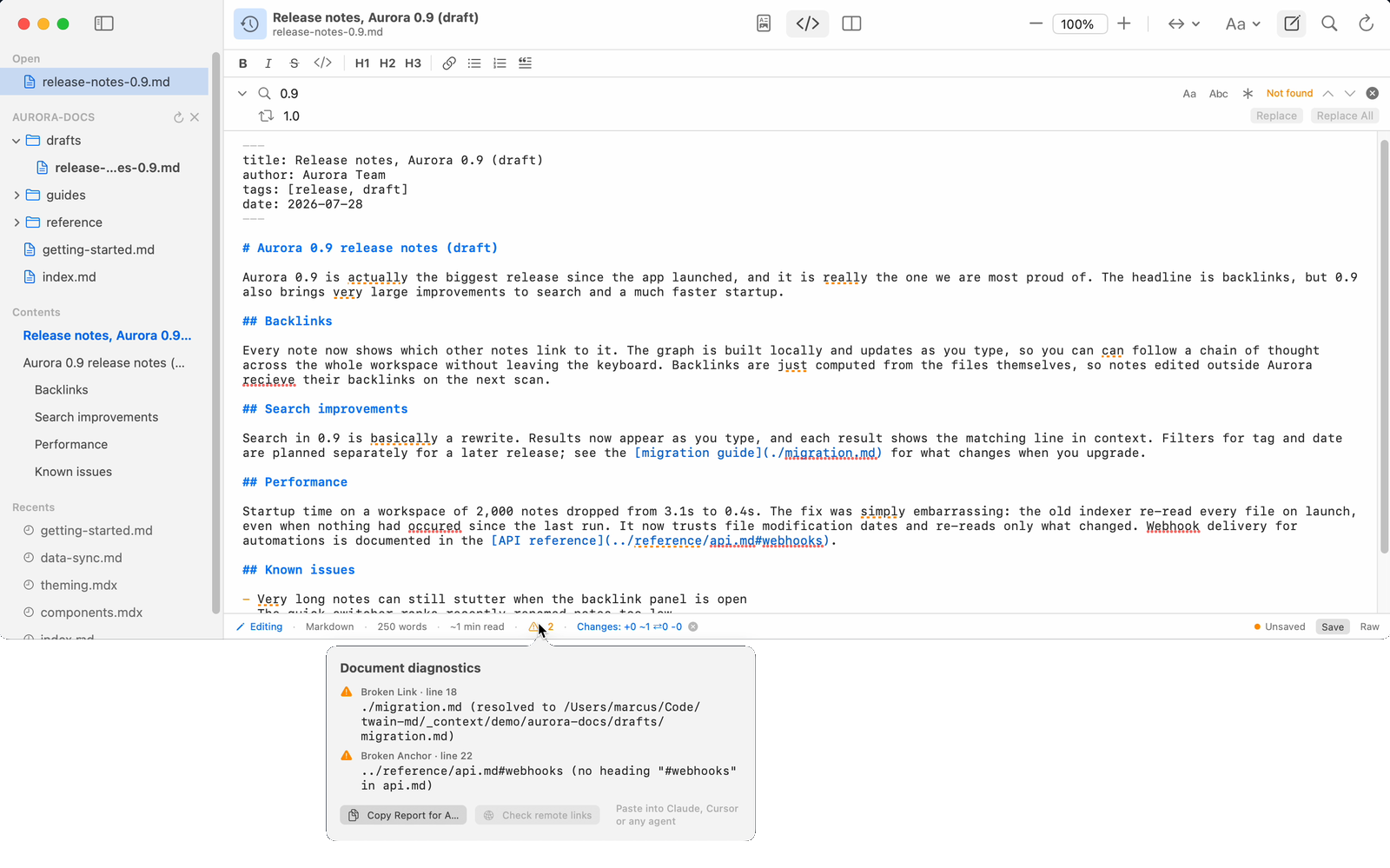
A missing local image or a link to a file that does not exist is reported as a diagnostic, shown
in the status bar and the diagnostics popover. Relative paths resolve against the document's own
folder. A path starting with / is resolved against the filesystem root, not a site root, so
web-style absolute references such as /img/logo.png are usually reported as missing when the
document is read as a file.
A link to a heading in another Markdown file, such as other.md#setup, is checked twice: the file
must exist, and it must contain a heading with that slug, or you get a broken anchor finding.
Anchors pointing within the same document, such as a bare #setup, are not checked.
Remote links
Checking remote (http and https) links reaches out over the network, so it is opt-in and only
runs when you ask.
Open the diagnostics popover from the status bar (the badge at the bottom of the window showing the finding count), then click Check remote links. Twain tries each remote link and image and reports the result:
- While running, it shows how many links it is checking.
- When finished, it shows either "All N remote links reachable" or how many were unreachable.
The badge appears only when the document already has at least one local finding, so a document with nothing else to report offers no way to start a remote check.
Each link is tried with a lightweight request first, falling back to a full request for servers that refuse the lightweight one. Requests use a short timeout and run a few at a time. A link that times out or returns an error is reported with the reason (for example a timeout or an HTTP status), and a network failure never interrupts your reading.
Remote link checking is never automatic and never runs on its own: no URL is probed unless you press the button.
That is separate from remote images. Load Remote Images is on by default on the Mac, so an
image with an http or https source is fetched as part of normal rendering. Turn it off in the
reading settings menu if you want a document to make no network requests at all; the status bar
then shows how many remote images were blocked.
In other tools
Most of the same checks are available outside the app, with one difference: broken anchors are
found only when a whole directory is scanned (twain-md check <dir>, twain-md inventory, or the
MCP twain_md_project tool), because validating a fragment needs the target file's headings.
Checking a single file reports missing images and broken links only.
- The CLI runs local checks by default, and remote checks when you pass
--remoteto a check of one or more files. Checking a whole directory never probes remote URLs:twain-md check docs/ --remoteaccepts the flag and silently skips the network. - The MCP server runs local checks only. It deliberately does not probe remote URLs, to avoid making network requests on behalf of an automated agent.